

Profile Management
Profile Management
User Profile ManagementView and update user profile details (name, email, phone number, etc.) Manage privacy and communication preferences Account Settings:Password change and reset functionalities. OTP management. Access history and activity logs. Role and Group ManagementAssign roles to users. View group memberships. Manage user groups and permissions.
Token Management
Token Management
Access TokensView active sessions and associated tokens Revoke specific or all active tokens Refresh TokensManage refresh token lifetimes and policies. Token DetailsProvide token metadata Support for JWT and opaque tokens Token introspection and validation
Multi-Factor Authentication (MFA)
Multi-Factor Authentication (MFA)
Authentication MethodsEmail-based OTP. MFA EnrollmentUser-friendly MFA setup wizard and APIs Management of multiple MFA devices
LDAP/AD Integration
LDAP/AD Integration
LDAP SupportIntegrate with on-premise LDAP directories. Support for LDAP authentication and user synchronization. Active Directory (AD) IntegrationSeamless integration with Microsoft AD for user and group synchronization. Support single sign-on (SSO) via AD. Periodic or event-driven user and group sync. User FederationAllow authentication using LDAP/AD credentials. Map LDAP/AD groups to IAM roles
Protocol Support
Protocol Support
Standard Authentication ProtocolsOAuth 2.0 for authorization. OpenID Connect (OIDC) for authentication. SAML 2.0 for federated identity and SSO. Token SupportSupport for JWT (JSON Web Tokens). Token revocation endpoints. FederationSupport for third-party identity providers (e.g., Google, Azure AD, Okta) Enable SSO via SAML or OIDC with external identity providers.
Tenant Management
Tenant Management
Multi-Tenancy SupportManage multiple tenants within the same IAM system Separate user data, roles, and permissions for each tenant Support for both “shared” and “isolated” tenant data models. Per-Tenant CustomizationAllow custom branding, themes, and domain configurations for each tenant. Tenant-specific authentication methods or identity provider configurations Tenant IsolationEnsure strict isolation of user data, logs, and permissions between tenants Enforce security policies specific to individual tenants.
Delegated Administration
Delegated Administration
Tenant-Level AdministratorsAllow specific users to act as administrators for their respective tenants. Provide scoped administrative capabilities (e.g., user management, group assignments) limited to their
tenant. Scoped PoliciesEnable policy-based access control at the tenant level Allow each tenant to define its own roles and permissions
User Management
User Management
Tenant-Specific User PoolsMaintain separate user directories for each tenant Support user federation within a tenant’s boundaries (e.g., LDAP/AD for one tenant) Group and Role ManagementAssign roles and permissions that are valid only within the scope of a specific tenant Disable Inactive UsersAutomatically disable user accounts after a defined period of inactivity. Configurable inactivity threshold (e.g., 30, 60, or 90 days). Send reminder notifications to users before deactivation, encouraging them to log in. Provide admins with a dashboard to view and manage inactive accounts. Allow reactivation of disabled accounts through admin approval or user self-service.
Restrict Multi-SessionsLimit the number of concurrent sessions per user (e.g., one session per device or user). Configurable policies for multi-session restrictions: Allow specific roles or users to bypass restrictions. Define session limits per user, group, or role. Automatically terminate previous sessions when a new session is created (optional). Admin interface to monitor and revoke active sessions for any user. Prevent simultaneous logins from different devices for sensitive roles or actions.
Restrict Multi-Sessions
Group Management
Group Management
Organization GroupsOrganization Groups, a feature designed to enhance the structure and management of users within an organization or tenant. Organization Groups allow users to be categorized into different sections, each referred to as a group.Each group can have its own custom roles, permissions, and designated Group Admin(s). This feature introduces the concept of sub-organizations, enabling organizations to assign members to specific groups and define tailored permissions for each group, ensuring a more granular and flexible access control system.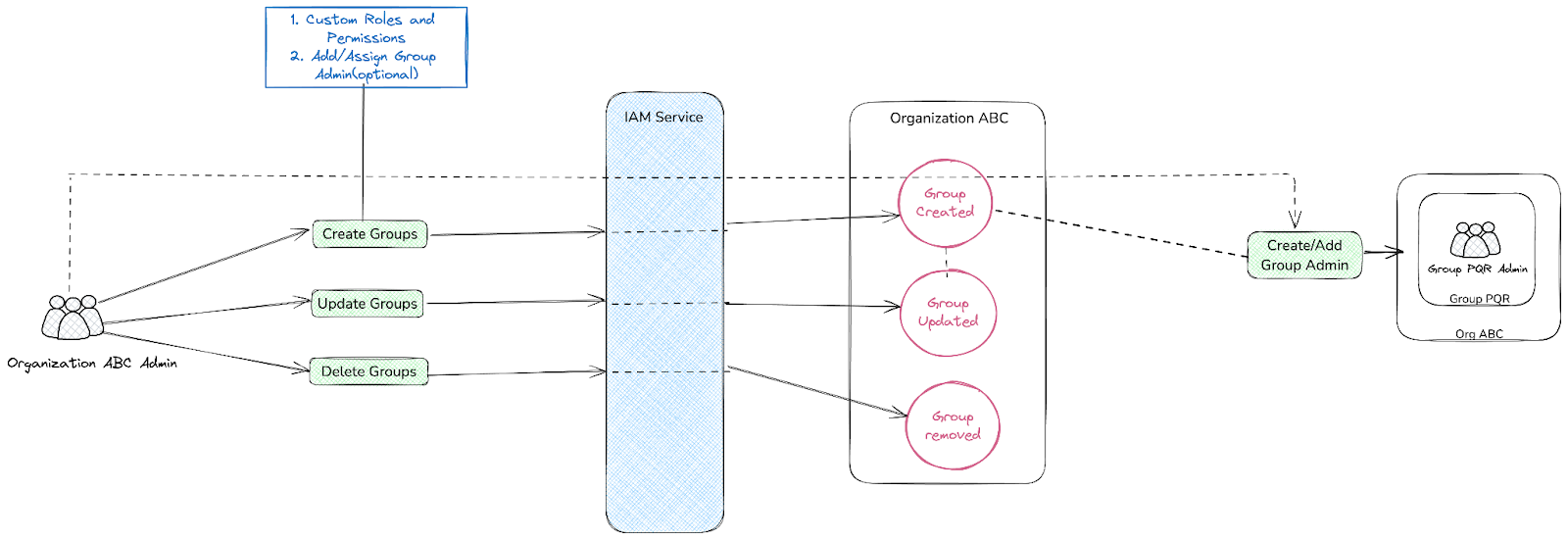 Group Admin Flow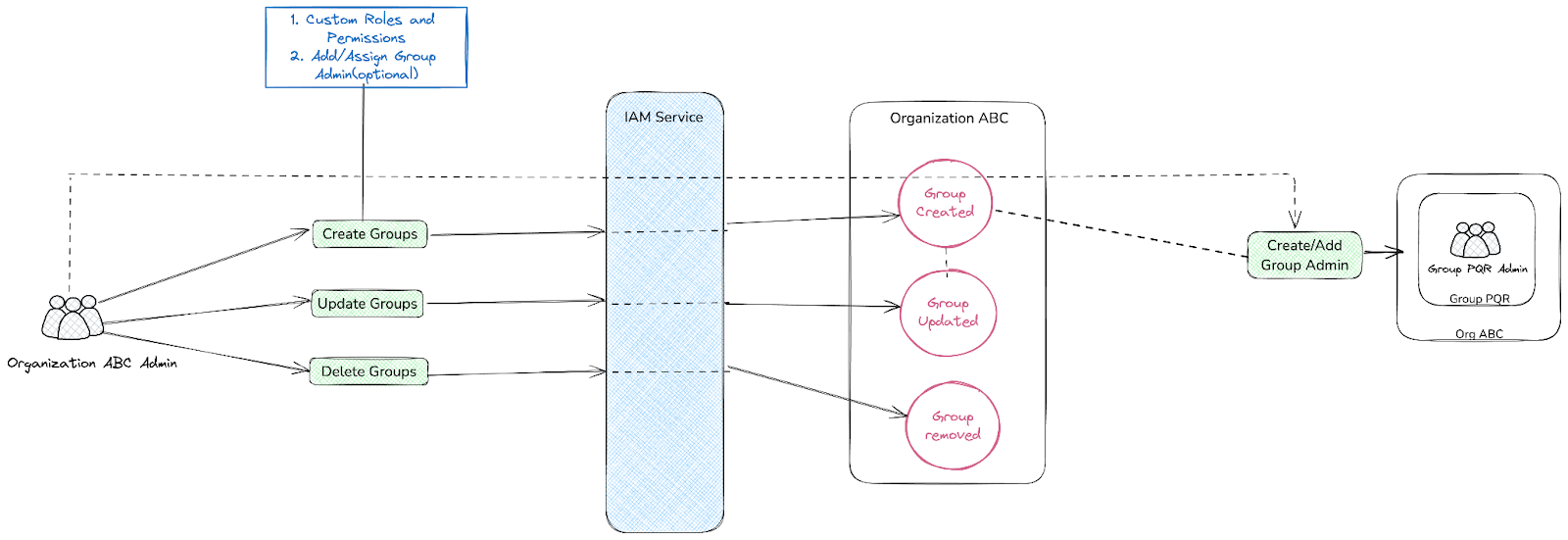
Functional Details
Feature WorkflowThe IAM service provides robust functionality for creating and managing organizations or tenants. These organizations serve as central entities where users can be invited to join and participate. Once part of an organization, users are assigned specific roles and permissions, which determine their level of access to the organization’s resources. These roles and permissions are integral to maintaining a secure and well-structured access control system, ensuring that users can only interact with the resources relevant to their responsibilities.Furthermore, Organization Groups support the assignment of Group Admins, who are entrusted with the responsibility of managing the group’s members and their respective roles. This decentralization of administrative tasks empowers organizations to distribute responsibilities effectively, particularly in larger, more complex environments. By allowing distinct groups to operate independently while still adhering to the broader organization’s governance, this feature provides a scalable solution for managing diverse teams and their unique needs.Hierarchy Flow
Hierarchy Diagram
- Super Admin is at the top level.
- Organizations under the Super Admin, each with its own Organization Admin.
- Groups within each organization.
- Group Admins managing individual group members.
- Group Members at the final level, managed by Group Admins, Org Admins, and Super Admin.
Technical Details
ArchitectureThe architecture of Organization Groups is built on a modular design, leveraging the core IAM service for user and role management. The Group Management Module acts as an extension, allowing organizations to define and manage sub-entities (groups) with their own custom roles and permissions.Key Components- IAM Service: Handles the creation and management of organizations, users, roles, and permissions.
- Group Management Module: Responsible for creating and managing Organization Groups, assigning roles, and defining group-specific permissions.
- Group Admin Interface: Provides tools for Group Admins to manage members and permissions within their group.
- Database Layer: Stores information about organizations, groups, members, roles, and permissions.
- API Layer: Exposes endpoints for creating and managing groups, assigning roles, and retrieving group details.
Data Flow
- Group creation.
- Setting and enforcing group-specific roles and permissions.
- Assigning users to groups.
- Administering group members via the Group Admin interface.
Group Admin FlowNotification Support
Notification Support
Email NotificationsSend email alerts to users for key events, including: Customizable Email TemplatesProvide prebuilt templates for common notifications Allow admins to customize email content and branding (e.g., logo, colors, and footer) Localized EmailsSupport for multilingual email notifications based on user preferences Delivery Status TrackingTrack email delivery, open rates, and failures Provide error logs for failed email deliveries Per-Tenant Email Configuration (for multitenancy)Allow tenants to configure their own email sender details (e.g., sender name, domain) Provide support for tenant-specific email templates Event-Driven NotificationsConfigure notifications for various user lifecycle events (e.g., role assignment, account deactivation) Enable/disable specific notifications at the admin level
- Account creation and activation
- Password reset requests
- Account creation and activation
- Successful password changes
- Failed or suspicious login attempts
- Session expiration warnings
- Multi-Factor Authentication (MFA) setup and confirmation
- Role or permission changes
Security
Security
EncryptionData encryption (at rest and in transit). Support both symmetric and Asymmetric encryption Audit and LoggingRecord login attempts, token usage, and administrative actions Real-time monitoring and alerts for suspicious activities Access PoliciesGranular policy-based access control ( Cerbos)
Self-Service Features
Self-Service Features
Password RecoverySecure password reset flow (via email) Account ManagementSelf-service account deactivation User-initiated session termination
Developer & Integration Support
Developer & Integration Support
APIsComprehensive REST APIs for managing IAM functionalities SDKsSDKs for popular languages (nodejs) Prebuilt UI components for embedding IAM features DocumentationDetailed developer documentation and guides Example integrations and tutorials
Additional Features
Additional Features
Delegated AdministrationAllow specific users to manage subgroups or tenants Tenant ManagementMulti-tenancy support for SaaS applications Custom BrandingCustomizable login and profile pages Support for custom domain names.